Xavier Slim

Updated last year

Detect and connect to any Bluetooth device

If you're not satisfied with the Bluetooth detector on your PC then try BluetoothView which simplifies connecting to Bluetooth devices.

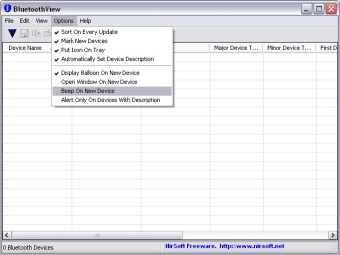
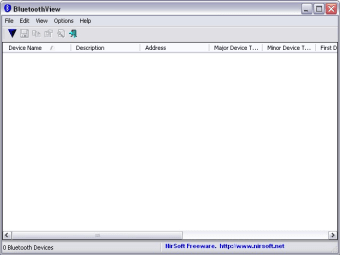
BluetoothView is a small utility that runs in the background and monitors the activity of Bluetooth devices around you. For each detected Bluetooth device, it displays the Device Name, Bluetooth Address, Major Device Type, Minor Device Type, First Detection Time, Last Detection Time and other minor details. The program works very discreetly and only notifies you in the taskbar with a popup when it has discovered a new device. However, if you don't want the balloon in your taskbar, you can always instruct it to use a beep sound instead. To be honest, unless your bluetooth detector on your PC is really poor you don't really need this utility but then again, if you constantly work between Bluetooth devices, then you'll find it a much better way to find and connect than manually searching for them.

If you're a heavy Bluetooth user, then you'll find that BluetoothView makes life easier in finding the devices you need to connect to.

Changes

Added 'Hide Paired Devices' option. Paired devices are usually detected even when they are not active, so this option allows you to hide them


Xavier Slim

    Xavier Slim has experience in English writing supported by academic recognition and creative competitions. He has worked on tutoring and editorial projects, developing content that balances clarity with creativity. His interests in writing and technology inform his practical approach to reviewing digital tools.

     0/2

    App specs

    • License

      Free

    • Version

      1.70
    • Latest update

    • Platform

      Windows

    • OS

      Windows Vista

    • Language

      English

      Available languages

      • English
      • French
    • Downloads

      1.5M

      Last month's downloads

      • 82
    • Size

      50.49 KB

    • Developer

    Program available in other languages


    User reviews about BluetoothView

    2.7

    2 reviews

    Main reviews for you

    • Anonymous user

      DOESN'T WORK!!. I got the BT device right in front of it and on and the program picks up on audio device from down the street. Tried over and over no avail! Cons: EVERYTHING

    • Anonymous user

      Not working!. I have the same problem, program is inactive! And i see no solutions here, pitty! Can't say more about.

    You may also like

    Alternatives to BluetoothView

    Explore Apps

    Latest articles

    Laws concerning the use of this software vary from country to country. We do not encourage or condone the use of this program if it is in violation of these laws.
    Softonic
    Your review for BluetoothView
    Softonic

    Is BluetoothView safe?

    97/100

    Score result: Clean

    This file passed a comprehensive security scan using VirusTotal technology. It is safe to download.

    • Virus free
    • Spyware free
    • Malware free
    • Verified by Security Partners

      VirusTotal logo

    Scan Info

    Last scan
    Wednesday, April 2, 2025
    Scan provider
    VirusTotal · Full report

    File Integrity

    File
    bluetoothview.zip
    SHA256
    a2b9b7c2863daebebab66b8a5f95d0fd2cc5d3cf3d990b118b0f6f6c7e504d1d
    SHA1
    689805da8f98b85d652bf3fdbd049ab6bd370e7f

    Softonic security commitment

    BluetoothView has been thoroughly scanned by our advanced security systems and verified by industry-leading partners. This file comes from the official developer and has passed all our security checks, showing no signs of viruses, malware, or spyware.